The AI agent in your pocket. Any model. Real execution.
GUAD is a fully mobile, model-agnostic agentic platform. Bring any AI model with your own key, or subscribe for GUAD's curated models when you don't have an API. Either way, it plans the work, builds it in its own workspace, and keeps going until the job is done.
GUAD is not a chatbot. It is an *agent* that lives on your *phone,* houses *any* *model* you give it, and keeps working until the job is *done.*
Plans, executes, checks
One request. Ten tasks.
It plans the work, carries it out step by step, checks what it has produced, and keeps going until the job is finished. Hand it a list of ten separate tasks and it works through every one of them in a single run.
Fully mobile
Built for the phone first.
Conversation, image generation, live previews, and a full agent workspace, in one account and one interface, designed to run in the palm of your hand.
Model-agnostic
Your key, or ours.
Connect any provider with your own API key and GUAD becomes the agent on top of it. No API? Subscribe and use GUAD's curated models instead.
01Agentic execution
It doesn't just answer. It executes.
Switch from Chat to Agent and GUAD gets a virtual workspace of its own: files, folders, agentic tools, and an agentic loop. It plans, builds, opens what it made, tests it, fixes what's wrong, and only then hands it back.
A virtual file workspace
Agentic tools and an agentic loop over real files and folders that live in the app. No setup, nothing to install.
Builds whole things
Creates files and folders, full games and websites included, from a single description.
Views and tests its own work
It opens what it built, clicks through it, and checks it before it finishes, and you can watch it test live instead of being handed something it never ran.
Live file viewing
Open any file GUAD creates without leaving the conversation: documents, PDFs, slides, images, code, data, and more. Web pages and apps run live right where you're working.
Agent mode is a switch. Stay in Chat for ordinary conversation; switch to Agent when you want something built.
9:41●●●
GUAD
ChatAgent
Build a snake game with a high-score board, then test it.
Workspace
Plan 0/7
preview · snake/index.html
Ask GUAD to build…
→
02Intelligent model routing
Every step, to the right model.
Automatic Model Routing reads each step of the work and assigns it to the model best suited to it, so you get the most out of your usage without giving up quality. Prefer to drive? Choose the model yourself at any time, switch mid-conversation, and the context follows you.
Automatic Model Routingauto
Incoming stepimage attached
Waiting for work
AstroEfficient0 steps
PulsarAdvanced0 steps
QuasarFrontier0 steps
Or pick the model yourself, any time, mid-conversation.
AutoRouting is on by default, so you rarely need to choose a model yourself.
Think HarderAsk for more depth when a problem needs it.
Mid-chatSwitch models at any point. Context follows you.
Your callOverride the router and choose the model any time you like.
03Multi-model support
Three curated models. Plus any you bring.
No API key? Every paid plan comes with GUAD's curated lineup: every model multimodal, every model reasoning in depth. Already have a key? GUAD houses that model too, with the same agent, memory, and tools.
AstroEfficient
Efficient
Astro
Low-latency responses for everyday questions, quick drafts, and high-volume work.
Fast and light on usage. It is the model routing reaches for first when a step doesn't need more.
Efficient
Reasoning
Multimodal
Lite · Pro · Expert · Max
PulsarAdvanced
Advanced
Pulsar
The everyday default for serious work.
Strong reasoning, image understanding, and quality output at a sensible speed.
Reasoning
MoE
Multimodal
Lite · Pro · Expert · Max
QuasarFrontier
Frontier
Quasar
The most capable model on the platform, built for long-horizon work.
Deep reasoning for the hardest problems and the longest agent runs.
Flagship
Deep Reasoning
Multimodal
Lite · Pro · Expert · Max
YoursAny model
+Bring your own key
Any model.
OpenAI, Anthropic, Google, local servers, or any custom endpoint.
Same agent, same memory, same tools, on top of the model you already use.
Switch between any of them mid-conversation. Context follows you.All three are multimodal and reason in depth.
Multimodal · Image generation
See it. Make it.
Every model sees.
Astro, Pulsar, and Quasar are all multimodal. Attach an image to your message and the model reads it, breaks down what's in it, then keeps discussing it with you in the same conversation.
The platform creates.
Image generation is built into GUAD itself. Create and edit images inline, inside any conversation. No separate tool, no new tab.
Reasoning
It thinks it through. You can watch.
Every model in the lineup (Astro, Pulsar, and Quasar) reasons in depth before it answers. It works the problem out, weighs the approaches, and catches its own mistakes on the way to a response. Turn on Show Reasoning and that thinking streams live across the top of the screen, word by word, as it happens. Leave it off and you just get the answer.
In depth, on every model
Astro, Pulsar, and Quasar all reason before answering.
Show Reasoning, live
Watch the reasoning stream in as it's generated, not as a summary served up after the fact.
Better answers on hard problems
Multi-step maths, debugging, planning, and analysis all benefit from the model working before it writes.
Two trains leave 300 km apart, at 90 and 60 km/h. When do they meet?
✕
The platform
Everything else, built in.
Conversational AI with in-depth reasoning, image generation and understanding, Google integrations, memory, and a live agent workspace, all in a single unified interface. No tab-switching, no context loss.
Memory that recalls what was actually said
Persistent memory with precise retrieval
Recalls what was actually said in earlier conversations, not a loose impression of it
Full conversation history across sessions
Turn memory on, review it, or reset it from Settings
Google
Draft and Send Emails
Add Calendar Event
Summarize Inbox
Add Reminders
Voice ChatBeta
Spoken, out-loud conversations on an on-device model, or bring your own ElevenLabs key for different voices.
Web search
Live internet access, so answers draw on current information rather than only each model's built-in knowledge.
Skills
Save instructions once and recall them with / commands: your workflows, prompts, and formatting rules, one shortcut away.
File & image uploads
Attach a file and GUAD reads, analyzes, and works with its contents. Attach an image and the model reads it, then keeps discussing it with you.
Your conversations, your call
Conversations are stored to give you persistent history across sessions. View, continue, or permanently delete any conversation, or your whole history, at any time.
Platform capabilitiesEvery capability above is live on every plan.
Guad Code
A team of agents, working for you.
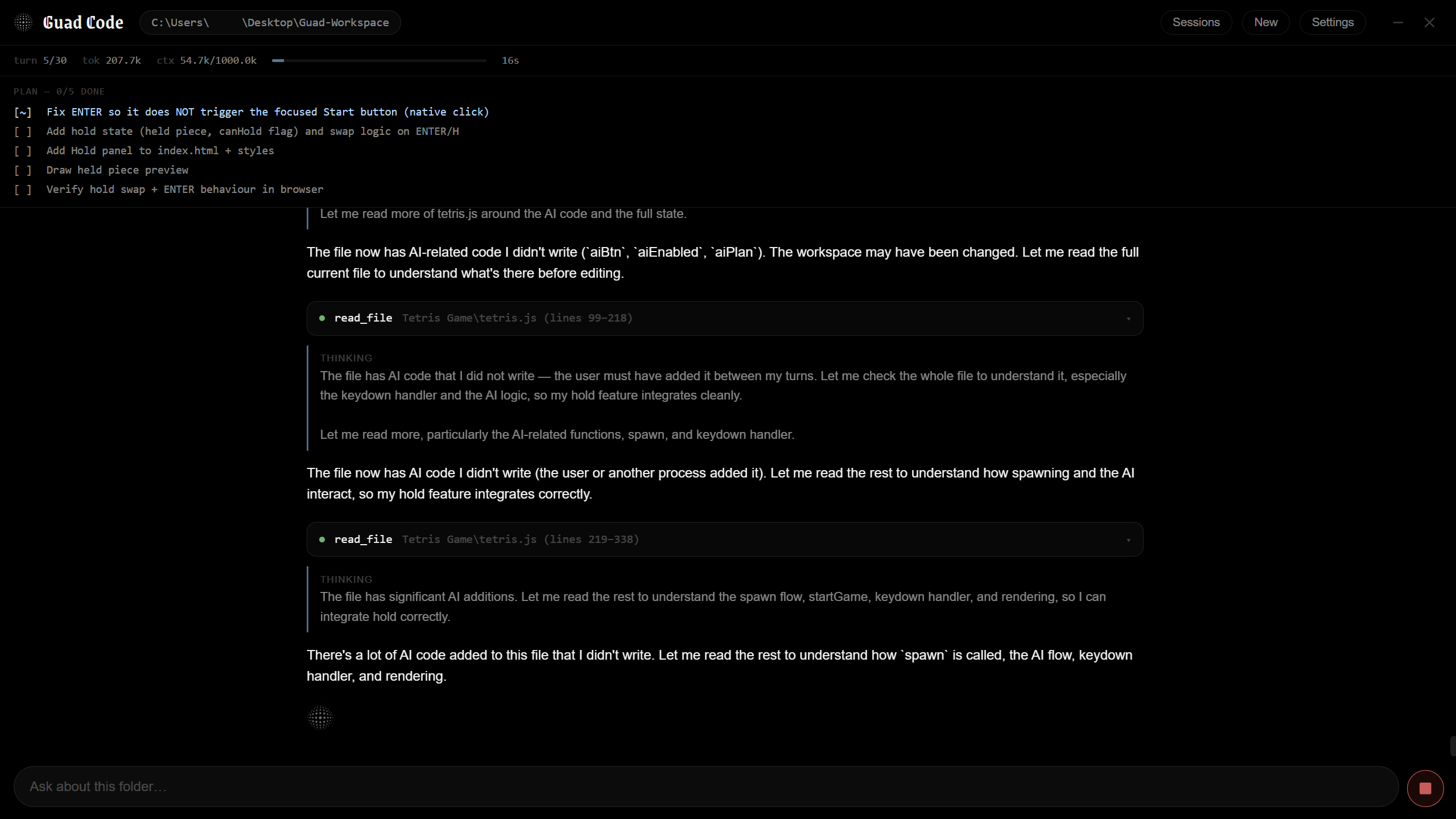
Guad Code is a desktop app that puts a whole team of AI agents on your project. A lead agent plans the job, spins up sub-agents for each part, and orchestrates them so they work in parallel and check each other's work. Completely bring-your-own-key.
Guad CodeSub-agentsOrchestrationBYOKRemote Control
Sub-agents on demand
The lead agent spins up specialists for research, building, testing, and review, each with its own focused task.
Orchestrated, not chaotic
One orchestrator splits the work, hands it out, checks every result, and merges it back, so the team moves fast without colliding.
Completely BYOK
Your provider, your key. No GUAD usage meter: requests go straight from your machine to the provider you chose.
Your folder, your machine
The team works inside one workspace folder you pick, across as many repositories as it holds.
Remote Control
Pair your phone and steer the whole team from anywhere. The agents, your files, and your keys never leave your computer.
Model-agnostic
House any model. Your key.
Prefer to work with a model that isn't in GUAD's selection? Connect any provider with your own API key and base URL: a cloud service, a self-hosted model, or your own inference server. GUAD becomes the agent on top of it, with the same chat, memory, and tools.
Any API key
Custom base URL
Cloud providers
Local model servers
Your data, your keys
Your API keys stay on your own device. They are never stored on GUAD servers, and are only ever used to make requests to the provider you chose. Local model servers are called straight from your browser. You stay in full control of your spend and your data.
Subscribe to use GUAD's curated models. Every plan gives you a monthly usage limit, spent at each model's exact token price, and usage credits keep you going past it. Start with the free trial, then pick the plan that fits.
Lite, Pro, Expert, and Max all include the full lineup and every capability below. Usage credits ($1 each, $0.50 of usage) work on every plan, including the free trial. You can connect your own API key on any plan, at any time; it never counts against your monthly limit.
Astro, Pulsar & Quasar
Auto-Routing & Think Harder
Agent mode: build full projects in a virtual workspace
GUAD is a fully mobile, model-agnostic agentic platform: an AI agent that runs on your phone and can house any AI model. Bring your own API key for whichever provider you like, or subscribe to use GUAD's curated models (Astro, Pulsar, and Quasar) if you don't have one.
Three: Astro for fast, efficient everyday work, Pulsar for balanced reasoning and quality, and Quasar for the most demanding long-horizon tasks. All three are multimodal and all three reason in depth. Every paid plan (Lite, Pro, Expert and Max) has all of them. By default, Automatic Model Routing picks the right one for each task, but you can switch between them yourself mid-conversation, and you can add any other model with your own API key.
Automatic Model Routing looks at each step of the work and assigns it to the model best suited to it, so you get the most out of your usage without giving up quality. It's on by default. You can override it and choose the model yourself at any time.
Yes. Every model (Astro, Pulsar, and Quasar) reasons in depth before answering, working the problem through and checking itself rather than replying from the first thing that comes to mind.
Show Reasoning is a toggle that displays the model's thinking as it happens. With it on, the reasoning streams into the conversation live while the response is being generated, so you can follow the steps and see where an answer came from. With it off, you just get the final answer. The reasoning still happens either way.
Yes to both. Every model is multimodal: attach an image to your message and the model will break down and describe what's in it, then keep discussing it with you in the same conversation. Image understanding is available on every plan, the free trial included. Image generation is a separate, platform-level feature: it creates and edits images inline, inside any conversation.
Agent mode is a mode you can switch into whenever you want to build something. Switching from Chat to Agent gives GUAD a virtual file workspace with agentic tools and an agentic loop: it can create files and folders, build full games and websites, and even view and test its own work before finishing. You can switch back to Chat at any time.
No. It's a switch. Stay in Chat for ordinary conversation and switch to Agent when you want something built. Everything else in GUAD behaves the same either way.
Yes. Switch to Agent mode and describe what you want. GUAD works inside a virtual file workspace, creating files and folders, building complete websites and games, and testing its own work while you watch, and you can open and run everything it makes right inside the conversation.
Yes. GUAD has live file viewing built into every conversation. It opens the files GUAD creates and the files you share (web pages and apps, documents, PDFs, slides, images, code, data, and more) right inside the chat. Web pages and apps run live when you choose to run them. No new tab, no download, no setup.
Agent mode works inside a conversation in GUAD, against a virtual workspace that lives in the app. Guad Code is a separate agentic coding harness you download and run on your own desktop, working directly on the real folders on your machine. Both can plan, build, and test complete projects. Agent mode needs no setup, while Guad Code puts a whole team of agents to work across your local repositories.
Guad Code is a desktop app that gives you a team of AI agents. You hand it a folder and a goal; a lead agent plans the work, spins up sub-agents for each part, and orchestrates them so they work in parallel and check each other's results. It is completely bring-your-own-key, so nothing is metered against your GUAD plan, and with Remote Control you can steer the whole team from your phone.
Yes. GUAD can run on top of virtually any OpenAI-compatible or custom endpoint: cloud providers, self-hosted models, or your own inference server. Keys are encrypted and stored securely on GUAD servers, and are only used to make requests to the provider you chose.
GUAD keeps a persistent memory of your conversations. Your messages are indexed as you go, and when something from an earlier conversation becomes relevant, GUAD retrieves exactly what was said rather than relying on a general impression of it. The result is an assistant that carries real context from one session to the next.
The memory index is stored locally on your own device. Nothing is kept on a server. You can turn memory on or off, and review or reset it, from Settings at any time.
Yes. Voice Chat lets you have out-loud, spoken conversations with GUAD. It's currently in beta, runs on an on-device model, and you can connect your own ElevenLabs API key if you'd prefer different voices. Enable it from the chat interface.
Yes: .json, .txt, .html, .csv, .md, .js, and .css. Attach a supported file and GUAD can read, analyze, and work with its contents directly.
Yes. GUAD has live internet access and can pull in current information rather than relying only on each model's built-in knowledge.
Skills let you save specific instructions once and reuse them on demand with a / command, so your custom workflows, prompts, and formatting rules are always one shortcut away.
Yes. Google Calendar, Gmail, and Google Reminders are supported on all plans, including the free trial. Connect your Google account in settings.
Conversations are stored to provide persistent history across sessions. You can view, continue, or delete any past conversation at any time, individually or your entire history. Deletion is permanent. See the Privacy Policy for full details.
GUAD is built to run fully on your phone today. A native Guad iOS App is also in development and will bring the same agent, all three models, reasoning you can watch, image generation, and your existing conversation history to iPhone and iPad. It isn't available yet.
No. Guad does not train, fine-tune, or own any AI models. Guad is built on a curated collection of large language models from trusted third-party providers, every one of them licensed for commercial use. Rather than developing foundation models from scratch, Guad evaluates and selects the best model for each use case. Your conversations are never used to train any model, ours or anyone else's.
Simpler, Smarter, Better.
Your agent. Any model. Anywhere.
Bring a key or pick a plan, then hand GUAD the work.